Audit Trail — System Activity Log
Detailed chronological record of every action and change in your TravelBoost workspace for compliance and accountability.
The Audit Trail section provides a detailed record of all actions and changes made within your organisation. It helps administrators monitor system activity, track user actions, and maintain accountability — your tamper-proof record of who did what, when, and to which records.
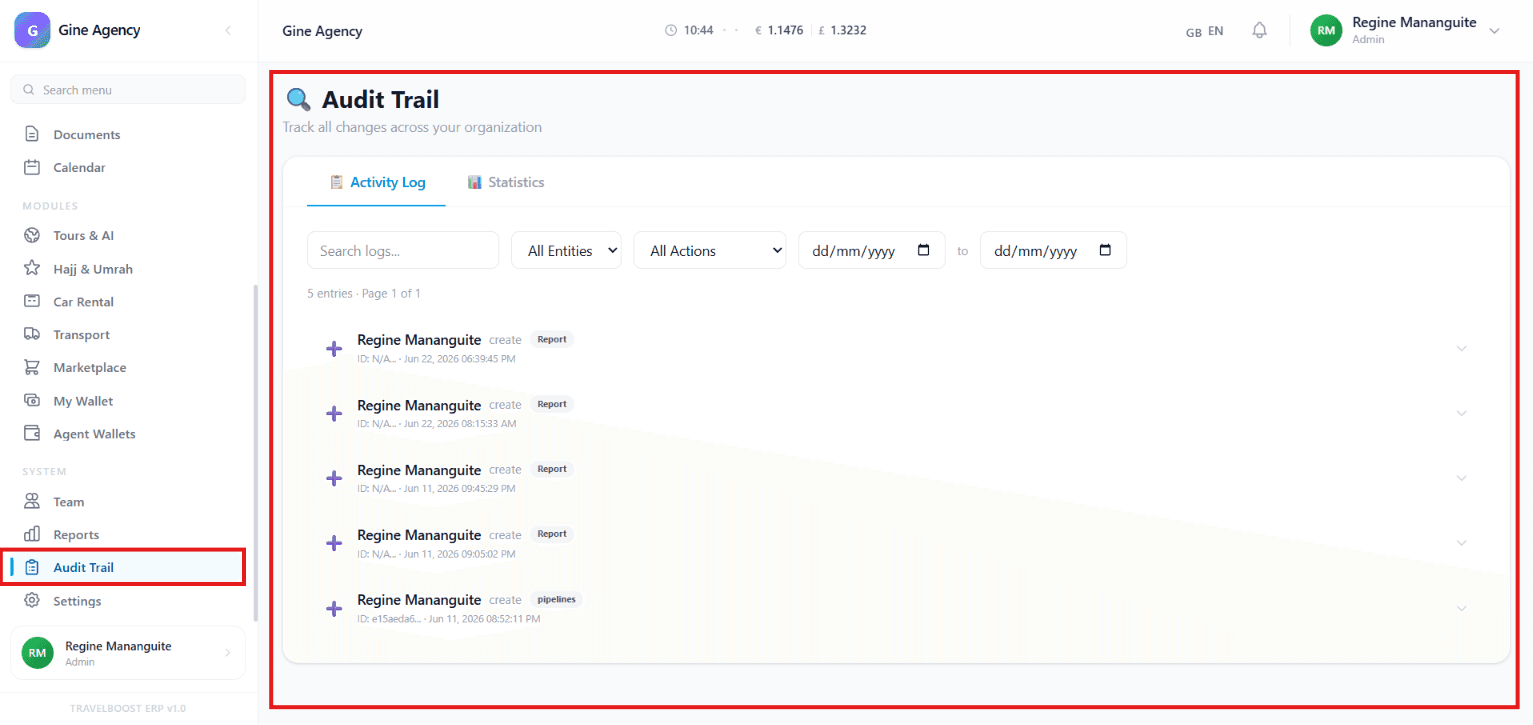
What You'll See on This Page
- Activity Log — A chronological list of actions performed by users
- Statistics — Summary data and analytics related to system activities and changes
- User Activity Entries — Records showing who performed an action, what action was taken, and when it occurred
- Entity Information — Identifies the module or record affected by the action
- Timestamp — Displays the exact date and time of each activity
Why this matters for your agency
Three real scenarios where audit trails save the day:
- A customer disputes a quoted price — open the audit log, filter by customer + proposal ID, see exactly what was sent and when. Dispute resolved in 30 seconds.
- A booking goes missing — filter audit log by entity = booking, action = delete, date range = today. Identifies who deleted it, when, why. Restore in one click.
- Compliance review — export the audit log for the period. Show your regulator exactly who accessed what data. Stay compliant with one click.
Search and Filter Options
You can quickly locate specific records using:
- Search Logs — Find activities using keywords, usernames, or record information
- All Entities — Filter logs by system modules or record types
- All Actions — Filter activities based on action type
- Date Range Filter — View logs within a selected period
- Start Date
- End Date
How to investigate a specific incident
- Set the date range
Narrow to the window when the incident occurred — if you know it was "sometime last Tuesday afternoon", set Start = last Tuesday 12:00, End = last Tuesday 18:00.
- Filter by entity
If it was about a specific record (e.g. Booking #12345), filter by entity = Bookings, record ID = 12345.
- Filter by user (if known)
If you suspect a specific team member, filter by their user. Otherwise leave it open and look at all users active in that window.
- Sort by timestamp ascending
You'll see the sequence of events in order. The exact moment things changed is visible.
- Click any entry for details
Each entry expands to show before/after values for Update actions, full record JSON for Create/Delete actions, and the user's IP + browser.
Activity Types
The Audit Trail tracks various system actions, including:
- ➕ Create — New records or entries added to the system
- ✏️ Update — Existing records modified
- 🗑️ Delete — Records removed from the system
- 🔐 Login — Successful user authentication
- 🚪 Logout — User session ended
- 📤 Export — Data exported (CSV, PDF, etc.)
- 📥 Import — Bulk data imported
- 🔑 Permission change — Role or permission modified
Log Information Displayed
Each activity record may include:
- User Name — Person who performed the action
- Action Type — What action was completed
- Affected Entity — The module, record, or object impacted
- Record ID — Unique identifier for the affected item
- Date and Time — Exact timestamp of the activity
- Additional Details — Expanded information about the change when available
Statistics Tab
The Statistics section provides insights such as:
- Total number of recorded activities
- Most common actions performed
- User activity trends
- System usage patterns
- Change frequency over time
How statistics help your agency
The Statistics tab surfaces patterns you'd never see in raw logs:
- Most common actions — if "delete" is rising disproportionately, something is wrong (training? bad UX? sabotage?).
- User activity trends — silent users (no activity) might mean they're not using TravelBoost (training need) or might be leaving.
- Change frequency over time — spikes correlate with operational stress; flat lines might mean over-staffing.
Benefits of Audit Trail
The Audit Trail helps you:
- Monitor team activity
- Track important system changes
- Improve accountability and transparency
- Investigate issues or unexpected changes
- Maintain compliance and record keeping
- Review historical actions when needed
Administrative Uses
Administrators can use Audit Trail to:
- Verify who made specific changes
- Review account activity
- Track updates to reports, clients, or records
- Monitor security-related actions
- Audit business operations and workflows
Frequently asked questions
Is the Audit Trail tamper-proof?
Yes — entries are append-only. Even agency administrators cannot edit or delete past entries. The log is retained for 7 years by default (configurable per regulatory requirements in your jurisdiction).
Can I see what data was changed, not just that a change occurred?
For most action types yes — Update entries include before/after values so you can see exactly what changed. For sensitive fields (passwords, 2FA secrets), only the action is recorded, never the value.
How long are audit logs retained?
7 years by default — covers most jurisdictions' compliance requirements. Configurable in Settings → Compliance → Audit retention. For specific regulatory needs (HIPAA, GDPR with specific extensions), shorter or longer windows can be set.
Can I export the audit log?
Yes — filter to the records you need, click Export, choose CSV or PDF. Useful for compliance audits, legal disputes, or feeding into your SIEM if you have one.
Does the Audit Trail include API access?
Yes — every API call (whether from your team, the WordPress plugin, a marketplace connector, or a third-party integration) is logged with the user/system that initiated it, the action taken, and the response status.