
Tour Builder & Catalog
Day-by-day itinerary builder, AI auto-pricing, public catalog, and 6-step booking wizard for tour operators.
The Tours & AI section helps tour operators create, manage, and optimise tour packages. It provides tools for organising tour catalogs, tracking departures, handling inquiries, and analysing tour performance. With built-in AI Studio, tour content can be generated and enhanced automatically — turning the most time-consuming product in travel into a streamlined operation.
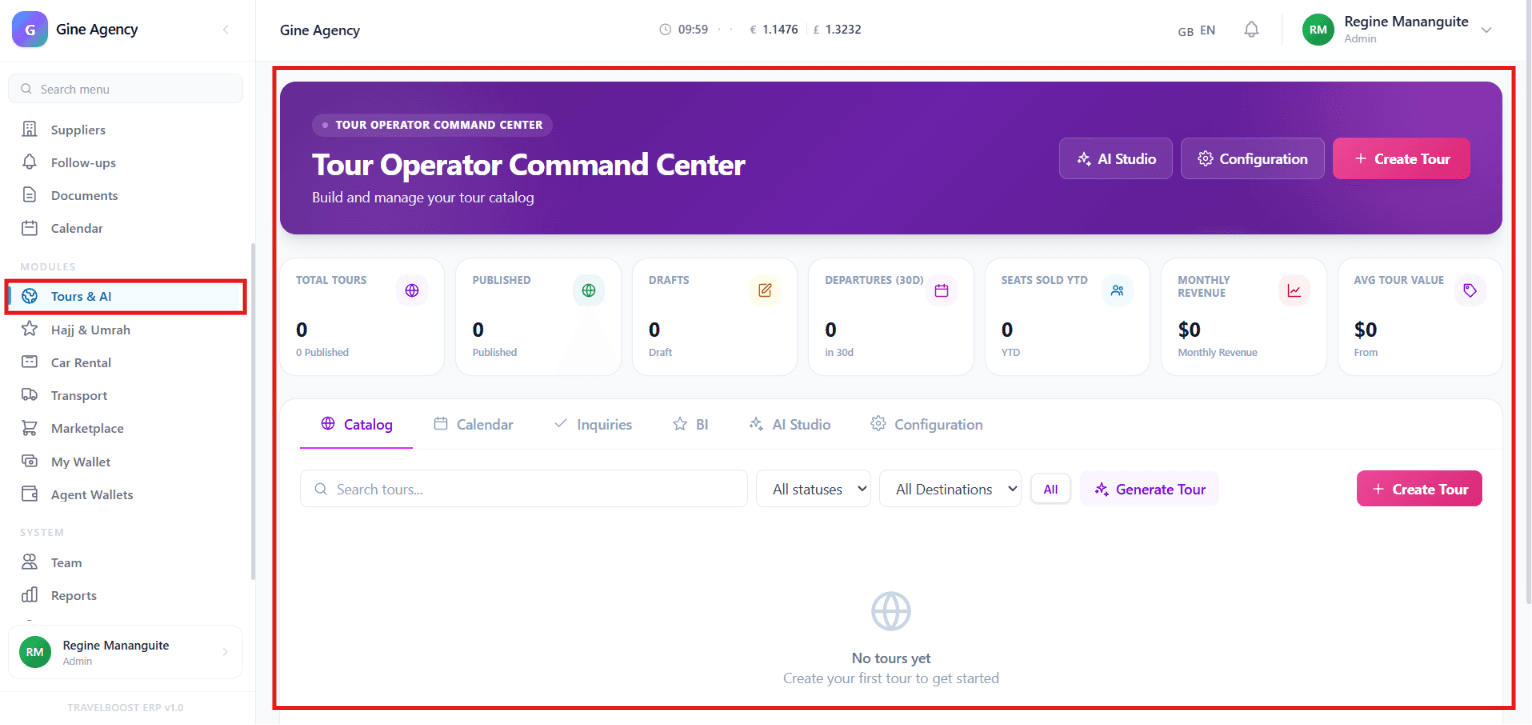
What You'll See on This Page
- Total Tours — Total number of tours created in the system
- Published — Tours that are currently available for booking
- Drafts — Tours that are still being prepared and not yet published
- Departures (30D) — Scheduled tour departures within the next 30 days
- Seats Sold YTD — Total seats sold year-to-date
- Monthly Revenue — Revenue generated from tours during the current month
- Avg Tour Value — Average value of tour bookings
Why these numbers matter
These seven KPIs tell you the health of your tour business at a glance. Published vs Drafts tells you whether you're shipping or stuck in WIP. Departures (30D) is your near-term workload — operations needs to scale to it. Seats Sold YTD divided by capacity is your fill rate. Avg Tour Value trending up means you're selling premium products well; trending down means you're discounting too aggressively.
Quick Actions
- AI Studio — Use AI-powered tools to generate and enhance tour content
- Configuration — Manage tour settings, preferences, and system configurations
- + Create Tour — Create a new tour package manually
How AI Studio helps your agency
The hardest part of running a tour business is producing content. A 7-day Italy tour needs a hero description, a day-by-day breakdown, hotel recommendations, an inclusions list, an exclusions list, an FAQ, and a cancellation policy — easily 6 hours of writing per tour template. AI Studio drafts all of this from a destination + duration + budget input. You review and edit; most tours go from blank to publish-ready in 30–45 minutes.
Navigation Tabs
- Catalog — View and manage all tour packages
- Calendar — Track tour schedules, departures, and important dates
- Inquiries — Manage customer inquiries and booking requests
- BI (Business Intelligence) — Analyse tour performance and sales trends
- AI Studio — Access AI tools for tour creation and content generation
- Configuration — Customise tour-related settings and workflows
How to use each tab
- Catalog
Where every tour template lives. Search, filter by destination/status, edit, duplicate, or publish/unpublish. This is your library.
- Calendar
Every scheduled departure shown by date. Use it to spot capacity issues, plan supplier capacity, or coordinate guides across multiple tours running on the same week.
- Inquiries
When a visitor on your public tour catalog clicks "Enquire", their question lands here. Assign to an agent, reply directly, convert to a proposal when ready.
- BI
Tour-level performance: bookings per template, revenue by destination, departure fill rate, seasonal trends. Where you decide which tours to invest in expanding.
- AI Studio
The content generation workspace. Pick a tour template, ask AI for a day-by-day itinerary, edit, save back. Repeat for descriptions, FAQs, marketing copy.
- Configuration
Tour settings: default markup %, default expiry, public catalog URL, AI auto-pricing rules, custom field definitions.
Tour Management Tools
- Search Tours — Quickly find tours by name or keyword
- Status Filter — Filter tours by publication status (Published / Draft / Archived)
- Destination Filter — View tours by destination
- Generate Tour — Use AI to automatically create tour packages and descriptions
- + Create Tour — Add a new tour package manually
What You Can Do
- Create and publish tour packages
- Manage tour schedules and departures
- Track bookings, sales, and revenue
- Respond to customer inquiries
- Use AI to generate tour content and itineraries
- Analyse tour performance and business growth
- Organise tours by destination and status
Frequently asked questions
What does AI Studio actually do?
AI Studio drafts tour content: full day-by-day itineraries from a destination + duration + budget, evocative descriptions, hero copy for the catalog page, even auto-generated FAQs. You review and edit — most agents save 60–80% on tour creation time.
What's the difference between Catalog and Calendar?
Catalog lists every tour template you offer (e.g. "7-day Imperial Cities of Morocco"). Calendar shows scheduled departures of those templates (e.g. "Imperial Cities departing March 14"). One template can have many departures with different prices and availability.
How do tour inquiries get into the system?
From the public tour catalog page (when a visitor clicks Enquire), from WhatsApp, from your website forms via the WordPress plugin, or from email. All inquiries land in the Inquiries tab with the tour context preserved.
Can I track which tours are most profitable?
Yes — open BI for breakdown by tour, by destination, by departure month, by sales channel. Combined with the per-booking P&L on each invoice, you see which tours actually make money after supplier costs.
How do I price a tour?
Tours pull supplier costs from your Suppliers module rate cards. You set a markup (% or fixed) per tour template. The system computes the public price and shows live margin as you build. AI auto-pricing is also available — adjusts based on demand, lead time, and season.