
Hajj & Umrah Operations
Seasons, packages, pilgrim registry, visa batches, installments, ritual programs, and the live pilgrim portal.
The Hajj & Umrah section helps travel agencies manage religious pilgrimage operations. It provides tools for organising seasons, managing pilgrims, tracking visa applications, coordinating accommodations, monitoring payments, and handling group operations.
For agencies running Hajj or Umrah, this is the most operationally complex product in travel — visa regulations, group dynamics, religious sensitivities, and zero margin for error. TravelBoost turns it from spreadsheet chaos into a structured workflow.
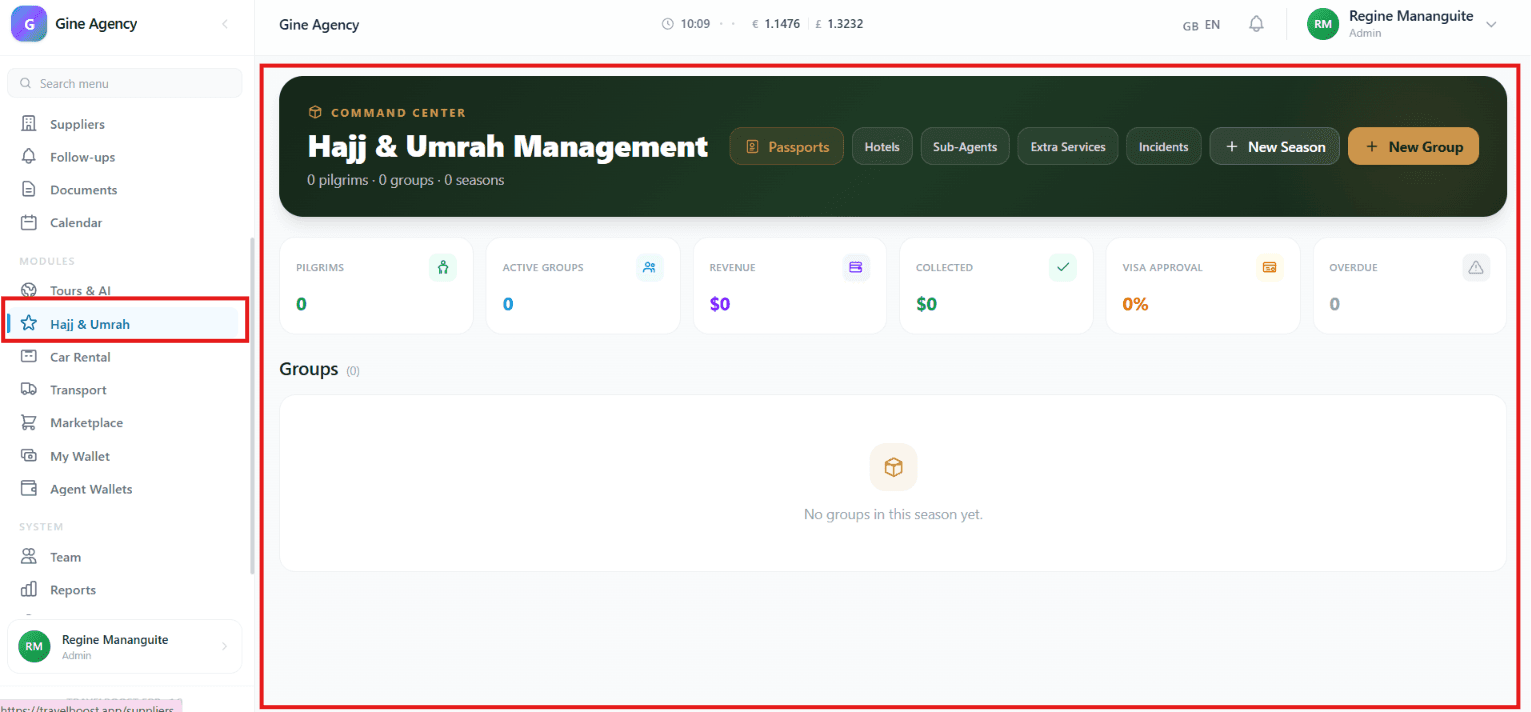
What You'll See on This Page
- Pilgrims — Total number of registered pilgrims in the current season
- Active Groups — Number of pilgrimage groups currently being managed
- Revenue — Total revenue generated from Hajj and Umrah bookings
- Collected — Total payments successfully collected from pilgrims
- Visa Approval — Percentage of visa applications that have been approved
- Overdue — Number of pending or overdue payments requiring follow-up
- Groups Section — Displays all pilgrimage groups created under the selected season
Why these numbers matter for your agency
Pilgrims and Active Groups tell you the scale of the season — your operational load. Revenue minus Collected equals what you still need to collect (your receivables risk). Visa Approval % below 95% means something is wrong in your application process. Overdue is the single most important alarm — overdue pilgrims often become withdrawal cases that hurt margins.
Quick Actions
- Passports — Manage and track pilgrim passport information and documentation
- Hotels — Manage accommodation arrangements and hotel assignments
- Sub-Agents — Coordinate with partner agencies and sub-agents
- Extra Services — Manage additional services such as transportation, meals, or special requests
- Incidents — Record and track operational issues or pilgrim-related incidents
- + New Season — Create a new Hajj or Umrah season
- + New Group — Create a new pilgrim group within a season
How to use the quick actions
- Start with + New Season
A Season is a specific Hajj or Umrah window (e.g. Hajj 1447H, Ramadan 2026 Umrah). Set the dates, the visa application window, the cancellation policy.
- Define the packages
Within the season, define the packages you sell (Economy 14-day, Standard 17-day, VIP 21-day). Each has its own price, inclusions, and supplier configuration.
- Create groups + + New Group
A Group is a physical departure unit (Group A, Group B…). Pilgrims belonging to the same group travel together, share buses, sleep in the same hotel.
- Add pilgrims to groups
Register pilgrims one by one or import in bulk. Each gets a full registry record: passport, mahram link, vaccinations, room preference.
- Process visas + assign hotels
Once pilgrims are registered, move to visa application (in bulk batches) and hotel/room assignment (drag-and-drop on a floor plan).
Navigation & Management Areas
- Season Dashboard — View overall statistics and performance for the selected season
- Groups — Manage pilgrimage groups and their members
- Pilgrim Records — Maintain traveller information and documentation
- Financial Tracking — Monitor revenue, collections, and outstanding balances
- Visa Management — Track visa processing and approval status
- Service Management — Coordinate accommodations, transportation, and additional services
Hajj & Umrah Management Tools
- Create Season — Set up a new pilgrimage season
- Create Group — Organise pilgrims into travel groups
- Manage Passports — Store and verify passport information
- Assign Hotels — Allocate accommodation arrangements
- Track Visa Status — Monitor visa application progress and approvals
- Manage Payments — Record collections and monitor overdue balances
- Handle Incidents — Log and resolve operational issues
- Manage Sub-Agents — Coordinate bookings and services through partner agencies
What You Can Do
- Create and manage Hajj and Umrah seasons
- Organise pilgrims into travel groups
- Track pilgrim registrations and records
- Manage passport and visa requirements
- Monitor revenue, collections, and outstanding payments
- Coordinate hotels, transportation, and extra services
- Work with sub-agents and partner organisations
- Track incidents and operational issues
- Monitor overall pilgrimage performance through dashboard metrics
Frequently asked questions
Does this work for both Hajj and Umrah?
Yes. Umrah is the simpler case (shorter window, less regulated). Hajj inherits everything Umrah has plus mahram validation, maktab assignment, and the larger visa batch workflow.
How do visa batches work?
Build a batch by selecting pilgrims (by group, status filter, or manually). The system validates required fields (passport expiry > 6 months, vaccinations current, mahram link for women). Export in the format your maktab requires — Saudi e-Hajj XML, Egyptian or Bangladeshi spreadsheets.
Can pilgrims pay in installments?
Yes — any installment schedule. Fixed monthly (12 × $300), stepped milestones (30% on booking, 30% at visa, 40% before departure), or bespoke per-pilgrim. Reminders go out automatically via WhatsApp + email.
How do sub-agents fit in?
Sub-agents enroll pilgrims through their own portal. Commission per pilgrim is configurable per sub-agent. Pilgrims they sign up appear in your registry with full attribution; their commission is auto-tracked in your AP ledger.
What happens when a pilgrim has a problem during the trip?
The pilgrim portal has an Emergency button — one tap shares their live location and a hotline link. Your operations team gets immediate notification. Incidents are logged on the pilgrim record for compliance and follow-up.