
Transport & Fleet
Vehicles, drivers, trips, routes, maintenance schedules, fuel logs, and live driver tracking.
The Transport section helps transportation operators manage vehicles, drivers, routes, trips, maintenance, pricing, and subcontractor coordination. Where Car Rental is built around customers renting your cars, Transport is built around your drivers running planned trips on your routes — airport transfers, intercity shuttles, group buses for Hajj/Umrah, charter services.
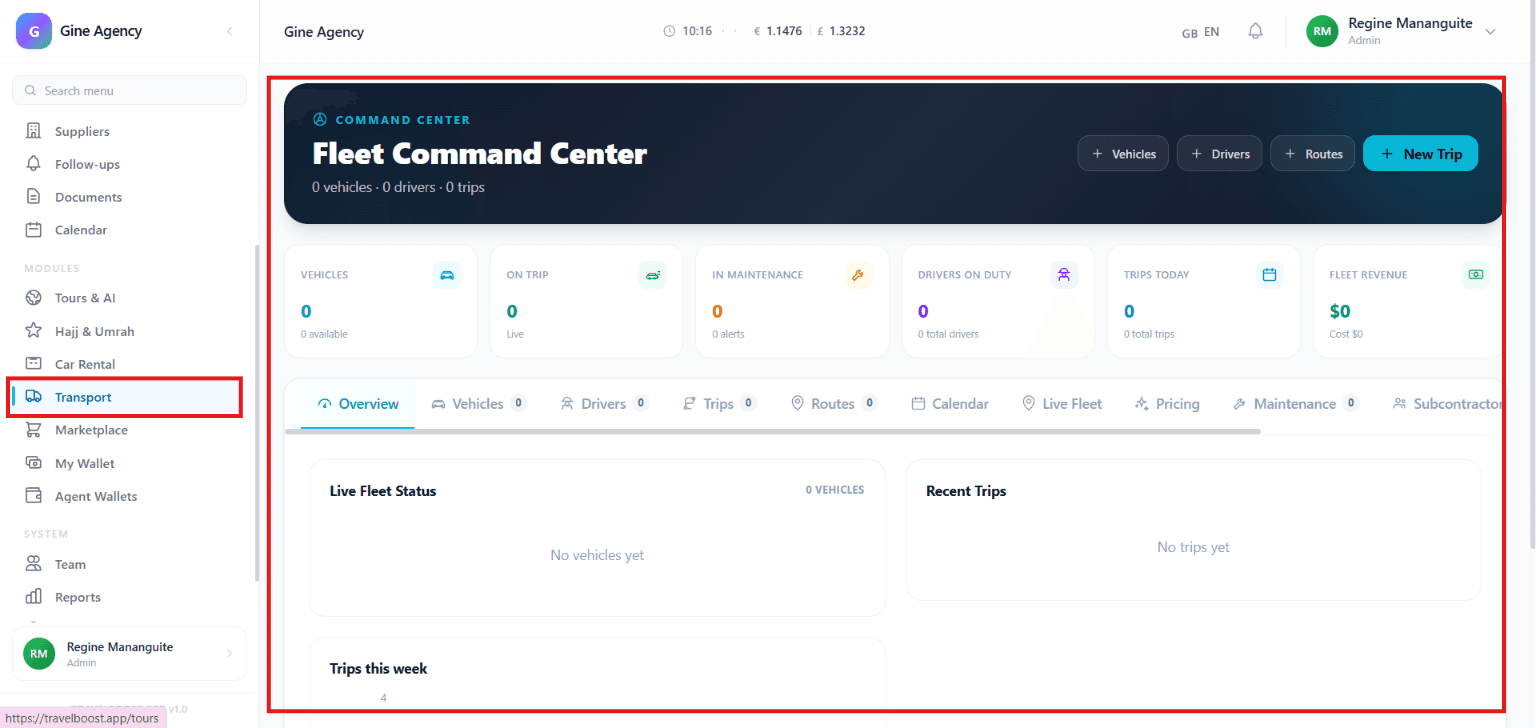
What You'll See on This Page
- Vehicles — Total number of vehicles available in the transport fleet
- On Trip — Number of vehicles currently assigned to active trips
- In Maintenance — Vehicles undergoing maintenance or requiring service
- Drivers On Duty — Number of drivers currently available and assigned for operations
- Trips Today — Total trips scheduled or completed for the current day
- Fleet Revenue — Revenue generated from transportation services
Why these numbers matter for your agency
On Trip divided by Vehicles is your fleet utilisation. Drivers On Duty tells you operational capacity. Trips Today is the operational load — if it spikes above driver capacity, you need to call subcontractors. In Maintenance count creeping up means your fleet needs renewal investment.
Quick Actions
- Vehicles — Add and manage fleet vehicles
- Drivers — Register and manage drivers
- Routes — Create and manage transportation routes
- + New Trip — Create and schedule a new trip
Navigation Tabs
- Overview — View transport performance, fleet status, and operational metrics
- Vehicles — Manage vehicle records and availability
- Drivers — Manage driver information, assignments, and schedules
- Trips — Track active, upcoming, and completed trips
- Routes — Manage transportation routes and destinations
- Calendar — View trip schedules and operational activities
- Live Fleet — Monitor vehicle locations and real-time fleet status
- Pricing — Configure transportation rates and pricing structures
- Maintenance — Track vehicle servicing and maintenance schedules
- Subcontractors — Manage external transport providers and partners
How to use the key tabs
- Vehicles
Your operational fleet — cars, vans, minibuses, buses. Each record includes capacity, fuel consumption, GPS device ID, and operating cost per km. The cost per km is what drives accurate per-trip profitability.
- Drivers
Driver roster with license class + expiry, medical fitness, hours-worked tracking, pay rate, and language skills. The system blocks assignment if a license has expired or hours-this-week limit would be breached.
- Routes
Saved journey patterns: origin, waypoints, destination, expected distance + duration, default vehicle class, default cost (fuel + driver + tolls + maintenance). Use them as templates for recurring trips.
- Trips
The bread-and-butter view. + New Trip → pick route + date → assign vehicle + driver → dispatch. The system surfaces constraint warnings before you confirm.
- Live Fleet
Real-time map of every GPS-tracked vehicle. Each one shows current location, speed, route, status. Click a vehicle for full trip details and ETA.
- Subcontractors
External transport providers. When your own fleet is fully booked, assign overflow trips to subcontractors with auto-calculated payable amounts.
Transport Management Tools
- Vehicle Management — Add, update, and monitor fleet vehicles
- Driver Management — Assign drivers and track driver availability
- Trip Scheduling — Create and manage transportation bookings and trips
- Route Planning — Organise routes and optimise travel operations
- Fleet Monitoring — Track fleet activity and vehicle status in real time
- Maintenance Tracking — Schedule and monitor vehicle maintenance
- Pricing Management — Set transportation rates and service charges
- Subcontractor Management — Coordinate services with third-party transport providers
What You Can Do
- Add and manage transport vehicles
- Register and assign drivers
- Create and schedule transportation trips
- Define and manage travel routes
- Monitor active trips and fleet operations
- Track vehicle maintenance and service requirements
- Configure transportation pricing and charges
- Work with subcontractors and external transport providers
- Monitor operational performance and revenue
Frequently asked questions
How do I assign a driver to a trip?
When creating a new trip (+ New Trip), pick from available drivers for the date. The system surfaces driver constraints (license expiry, hours-worked-this-week limit, rest period violations) so you don't accidentally schedule someone who can't drive.
Does the live tracking require special equipment?
Yes — vehicles need a GPS device that reports position to one of the supported providers. We support GPSGate, Wialon, Geotab, and generic NMEA. Without GPS, the rest of the module (assignment, hours, maintenance, billing) still works — you just lose the live map.
Can subcontractors see their assigned trips?
Yes — subcontractors get login access to a restricted Subcontractor Portal where they see only their assigned trips, mark trip status (started / picked-up / completed), upload proof-of-service photos.
How are subcontractor payments handled?
When you assign a trip to a subcontractor, the system creates a Payable to them automatically based on the route's subcontractor rate. Payables roll up into Finance → AP for monthly settlement.
Can drivers see their schedule on their phones?
Yes — drivers get a mobile-optimised page (login by phone OTP, no app to install) showing today's and tomorrow's trips. They can mark trips started, picked-up, dropped-off, completed, with optional photos and notes.