Marketplace — External Booking Channels
Connect Viator, GetYourGuide, Klook, Booking.com, Expedia and other marketplaces to sync bookings centrally.
The Marketplace section helps travel agencies connect with external booking platforms and automatically sync bookings, track revenue, and centralise channel management. Sell on Viator, GetYourGuide, Klook, Booking.com Experiences, Expedia, and Airbnb Experiences while keeping every booking organised inside TravelBoost.
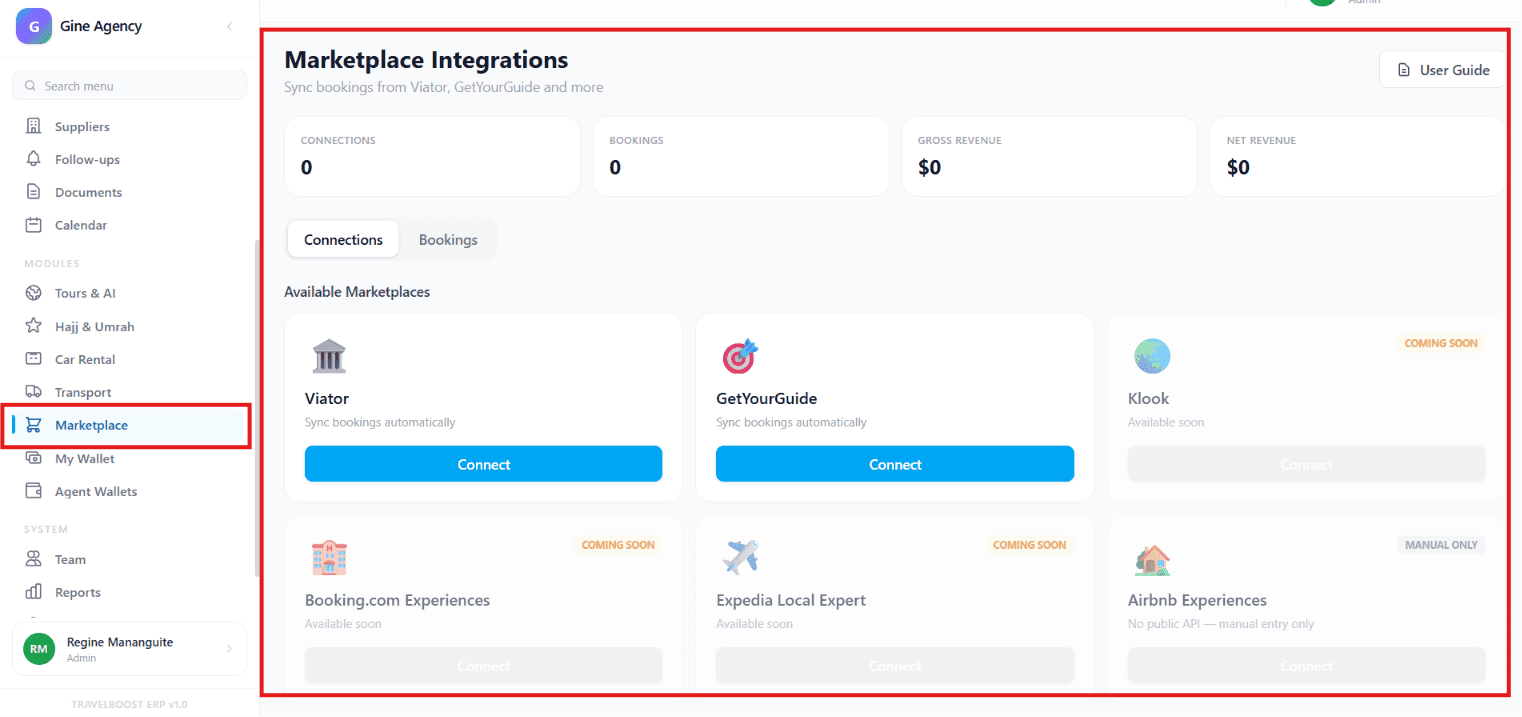
What You'll See on This Page
- Connections — Total number of active marketplace integrations
- Bookings — Total bookings received through connected marketplaces
- Gross Revenue — Total sales generated before commissions and fees
- Net Revenue — Total earnings retained after deductions and commissions
- Connections Tab — View and manage marketplace integrations
- Bookings Tab — View bookings imported from connected marketplaces
- User Guide — Access setup instructions and integration documentation
Why these numbers matter for your agency
Gross Revenue tells you how big a channel is by volume. Net Revenue tells you how profitable it is. The gap between them is the marketplace's cut — usually 20-30%. If a channel's Net Revenue percentage is dropping, the marketplace is squeezing your margin and it's time to renegotiate or shift focus.
Available Marketplaces
| Marketplace | Status | Notes |
|---|---|---|
| Viator | ✅ Live | Two-way sync; bookings + inventory + pricing |
| GetYourGuide | ✅ Live | Two-way sync; bookings + inventory + pricing |
| Klook | 🛠️ Coming soon | Q3 2026 |
| Booking.com Experiences | 🛠️ Coming soon | Q3 2026 |
| Expedia Local Expert | 🛠️ Coming soon | Q3 2026 |
| Airbnb Experiences | ⚠️ Manual only | Manual booking entry — no API available |
Why this matters
For most tour operators, the marketplaces drive 30-60% of total bookings. Without integration you're entering each booking manually, losing 5 minutes per booking, missing inventory sync errors, and double-booking customers. With integration the bookings flow in, the inventory stays accurate, and you can focus on selling.
Quick Actions
- Connect — Link a marketplace account
- View Bookings — Review imported bookings
- Monitor Revenue — Track marketplace sales and earnings
- Manage Integrations — Control connected marketplaces
- Access User Guide — View setup and usage instructions
How to connect a marketplace
- Open the Connections tab
You'll see a list of available marketplaces with their connection status.
- Click Connect on the marketplace
You'll be redirected to that marketplace's OAuth login page (e.g. Viator Partner Center, GetYourGuide Supplier Hub).
- Authorise TravelBoost
Confirm the permissions TravelBoost is requesting. Once authorised, you're redirected back to the dashboard.
- Configure sync direction
Choose what to sync: only inbound bookings (passive), or inbound + outbound (TravelBoost pushes pricing and availability to the marketplace too).
- Initial sync
The first sync pulls historical bookings (last 90 days by default) and registers your tour catalog with the marketplace. After this, real-time sync runs continuously.
Navigation & Management Areas
- Marketplace Dashboard — Overview of marketplace activity and performance
- Connections Management — Manage active integrations
- Booking Synchronization — Automatically import bookings
- Revenue Tracking — Monitor gross and net revenue
- Marketplace Performance — Analyse booking and sales trends
- Integration Settings — Configure marketplace connections
Marketplace Management Tools
- Connect Marketplace — Link external booking platforms
- Sync Bookings — Import reservations automatically
- Track Revenue — Monitor marketplace-generated income
- Manage Connections — Activate or disconnect integrations
- View Statistics — Monitor bookings and revenue metrics
- Review Imported Bookings — Access synced booking details
- Monitor Sync Status — Verify successful synchronisation
What You Can Do
- Connect supported travel marketplaces
- Automatically import marketplace bookings
- Track bookings across multiple sales channels
- Monitor gross and net revenue
- Centralise bookings in one system
- Reduce manual data entry
- Manage all integrations from one dashboard
- Monitor marketplace performance and activity
- Prepare for future marketplace integrations
Frequently asked questions
Which marketplaces are live today?
Viator and GetYourGuide are fully integrated with automatic two-way sync. Klook, Booking.com Experiences, and Expedia Local Expert are in development (Q3 2026). Airbnb Experiences supports manual booking entry only.
How does the booking sync work?
When a marketplace receives a booking, our connector pulls it into TravelBoost as a confirmed booking with all details (customer, dates, product, price, commission). The booking lands in your pipeline at the "Accepted" stage automatically.
What's the difference between Gross and Net Revenue?
Gross Revenue is the total customer-paid amount before any deductions. Net Revenue is what you actually keep after the marketplace's commission. Different marketplaces have very different commission structures (Viator 25-30%, GetYourGuide 20-25%) so net is the number that matters.
Can I push pricing changes from TravelBoost to the marketplaces?
Yes — when you update a tour's price in TravelBoost, the change propagates to connected marketplaces within minutes. Same for availability (closing dates, blocking sold-out).
What happens if the marketplace and my CRM disagree?
The Sync Status tab flags discrepancies (booking exists on one side but not the other, price mismatches, capacity overruns). You can resolve manually with one click — the system always treats your TravelBoost data as authoritative.