
Calendar — Agency Schedule & Deadlines
A unified calendar for follow-ups, departures, returns, invoice due dates, passport expirations, contracts, and Hajj schedules.
The Calendar section helps travel agencies schedule, track, and manage important business activities, travel events, deadlines, and customer-related tasks. Every dated event from every other module — follow-ups, trip departures, invoice due dates, passport expirations, Hajj schedules — appears here on one unified timeline.
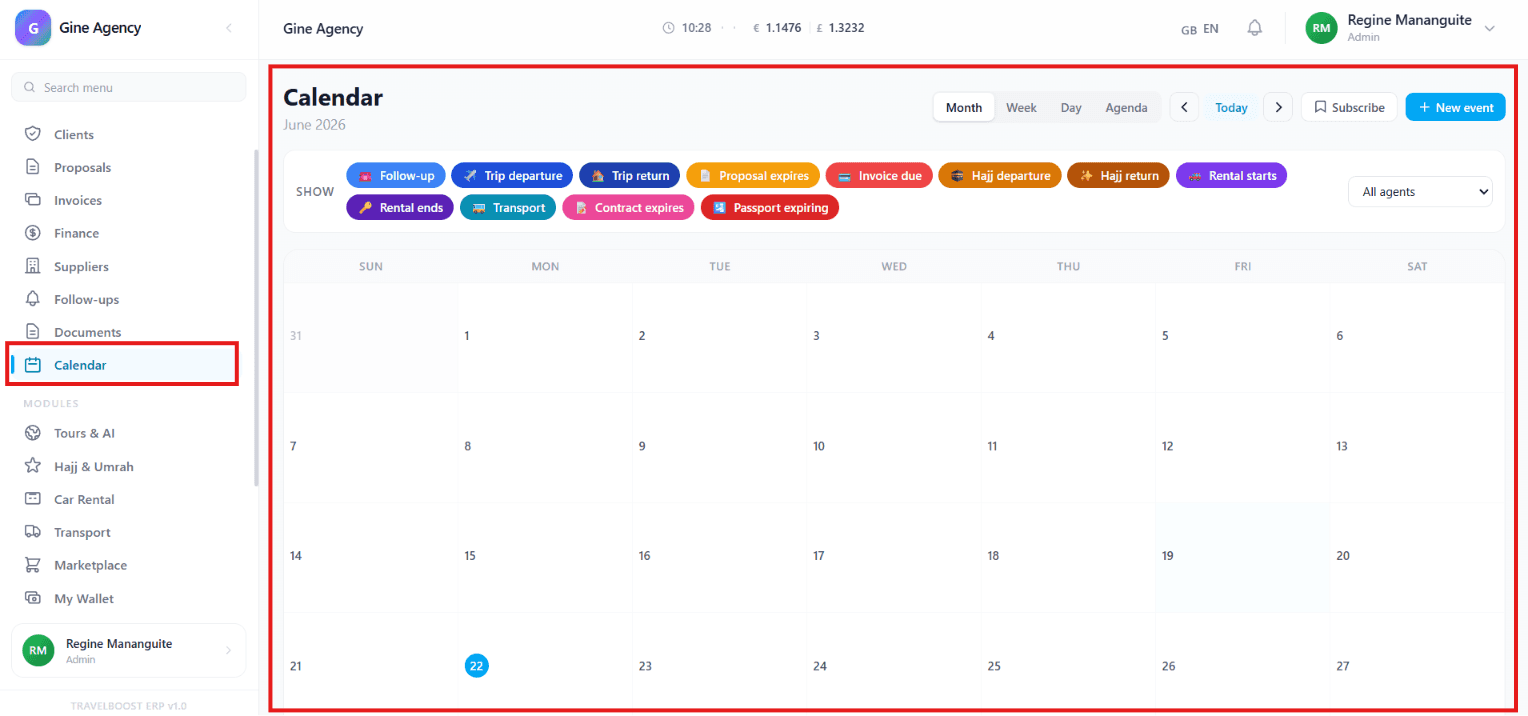
What You'll See on This Page
- Calendar View — Displays all scheduled events and activities by date
- Month View — View events organised by month
- Week View — View events scheduled within a week
- Day View — View detailed events for a specific day
- Agenda View — View events in a chronological list format
- Today Button — Quickly navigate to the current date
- Previous / Next Navigation — Move between calendar periods
- Agent Filter — View events for a specific agent or all agents
- Subscribe — Sync calendar events with external calendar applications
- + New Event — Create and schedule a new event
When to use each view
- Month — Strategic planning, capacity checks, identifying busy weeks ahead
- Week — The daily ops view for most agents — what's coming this week
- Day — Detailed schedule for today / a specific date, often used at the start of the day
- Agenda — A flat list of upcoming events — best for printing or sharing
Event Categories
The Calendar aggregates twelve distinct event types from across TravelBoost:
| Category | Source module | What it represents |
|---|---|---|
| Follow-up | Follow-Ups | Customer follow-up reminders and tasks |
| Trip Departure | Bookings | Scheduled travel departure dates |
| Trip Return | Bookings | Scheduled travel return dates |
| Proposal Expires | Proposals | Proposal expiration deadlines |
| Invoice Due | Invoices | Invoice payment due dates |
| Hajj Departure | Hajj & Umrah | Hajj pilgrimage departure schedules |
| Hajj Return | Hajj & Umrah | Hajj pilgrimage return schedules |
| Rental Starts | Car Rental | Vehicle rental start dates |
| Rental Ends | Car Rental | Vehicle rental end dates |
| Transport | Transport | Transportation service schedules |
| Contract Expires | Suppliers | Contract expiration reminders |
| Passport Expiring | Clients / Hajj | Passport expiration alerts |
Why this matters for your agency
Every category above used to live in a separate spreadsheet, a separate tab, a separate person's head. The Calendar makes the agency's operating tempo visible at a glance. A week with 12 trip departures and 4 contract renewals is structurally different from a quiet week — staff accordingly.
Quick Actions
- Create Event — Add a new event or reminder
- Filter Events — Display specific event categories
- Switch Views — Toggle between Month, Week, Day, and Agenda views
- Navigate Dates — Move forward or backward through the calendar
- View Agent Schedules — Filter events by assigned agent
- Subscribe Calendar — Connect with external calendar systems
Navigation & Management Areas
- Event Dashboard — View all upcoming activities and deadlines
- Schedule Management — Organise agency and customer events
- Trip Management — Track travel departures and returns
- Document Tracking — Monitor passport and contract expiration dates
- Financial Tracking — Monitor invoice due dates and payment deadlines
- Task Management — Track follow-ups and operational activities
- Agent Scheduling — Manage activities assigned to agency staff
Calendar Management Tools
- Create Events — Schedule appointments, reminders, and activities
- Manage Follow-Ups — Track customer communication tasks
- Track Travel Dates — Monitor departures and returns
- Monitor Expirations — Receive reminders for passports, contracts, and proposals
- Track Payments — Monitor invoice due dates
- Manage Rentals — Schedule rental start and end dates
- Coordinate Transportation — Track transport-related events
- Filter Schedules — Display relevant event categories only
What You Can Do
- Create and manage agency events and reminders
- Track customer follow-ups and tasks
- Monitor travel departure and return schedules
- Manage Hajj and Umrah travel dates
- Track invoice payment deadlines
- Monitor proposal, contract, and passport expirations
- Manage rental and transportation schedules
- View schedules by day, week, month, or agenda
- Filter events by category or assigned agent
- Keep all important agency activities organised in one calendar
Frequently asked questions
Do I have to manually add events?
No. Most events appear automatically from other modules: follow-ups from the CRM, departures from bookings, invoice due dates from billing, passport expirations from client profiles. + New Event is for one-off custom events only.
Can I see other agents' calendars?
Yes — use the Agent Filter to switch between your own view, a specific colleague's view, or the full team view. Managers can see everyone by default.
Does Subscribe work with Google Calendar?
Yes — Subscribe generates a private iCal URL. Add it to Google Calendar, Apple Calendar, Outlook, or any calendar app supporting iCal subscriptions. Events stay in sync automatically.
Can I filter by event category?
Yes — toggle category chips at the top of the calendar (Follow-up, Departure, Invoice Due, etc.). Useful when planning a "Departures this week" review or auditing upcoming passport expirations.
How far ahead does the calendar show?
There's no fixed horizon — you can navigate forward as far as you have data (e.g. trip departures scheduled 18 months out for Hajj). The Agenda view defaults to next 90 days.