
Car Rental
Fleet inventory, rental contracts, walk-around damage map, fines, and a customer survey at handover.
The Car Rental section helps rental operators manage vehicles, reservations, fleet availability, maintenance schedules, pricing, and customer loyalty programs. Every car, every rental, every dent, every fine — tracked from acquisition to disposal in one digital workflow.
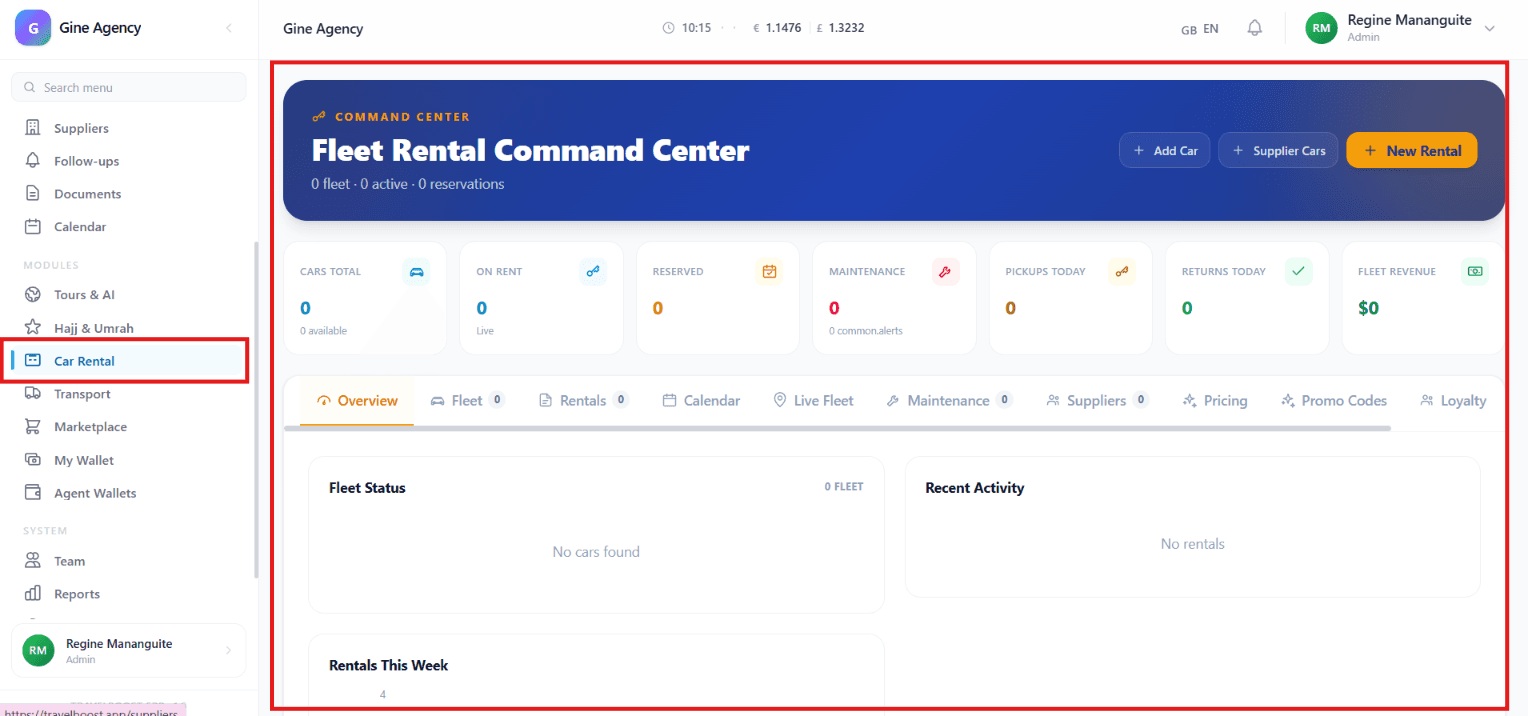
What You'll See on This Page
- Cars Total — Total number of vehicles registered in the rental fleet
- On Rent — Number of vehicles currently rented out to customers
- Reserved — Vehicles that have been booked but not yet picked up
- Maintenance — Vehicles currently undergoing maintenance or requiring service
- Pickups Today — Scheduled vehicle pickups for the current day
- Returns Today — Vehicles expected to be returned today
- Fleet Revenue — Total revenue generated from vehicle rentals
Why these numbers matter for your agency
On Rent divided by Cars Total is your utilisation rate — the single most important metric in fleet economics. Reserved is your forward booking. Pickups Today + Returns Today tells operations exactly how busy the desk will be. Maintenance count above 10% of fleet means you have an ageing fleet problem.
Quick Actions
- + Add Car — Add a new vehicle to the rental fleet
- Supplier Cars — Import or manage vehicles provided by suppliers or partners
- + New Rental — Create a new rental reservation or booking
Navigation Tabs
- Overview — View fleet statistics, rental activity, and key performance metrics
- Fleet — Manage all vehicles in the rental inventory
- Rentals — Track active, upcoming, and completed rentals
- Calendar — View rental schedules, reservations, pickups, and returns
- Live Fleet — Monitor real-time fleet availability and status
- Maintenance — Manage vehicle servicing, repairs, and maintenance schedules
- Suppliers — Manage vehicle suppliers and partner fleets
- Pricing — Configure rental rates, pricing rules, and fees
- Promo Codes — Create and manage promotional discounts
- Loyalty — Manage customer loyalty programs and rewards
How to use the key tabs
- Fleet
Every vehicle's record — VIN, registration, insurance expiry, service schedule, daily/weekly/monthly rates. Where you add new vehicles and retire old ones.
- Live Fleet
A real-time dashboard of your whole fleet. Each car shows current status with colour-coded badge. Click any vehicle for full details (current renter, return ETA, last service).
- Calendar
Visual rental schedule by date. Spot double-bookings, plan staff coverage for busy weekends, see which cars are blocked for maintenance.
- Maintenance
Upcoming services, both km-based and time-based. Schedule routine maintenance before a car becomes unrentable.
- Pricing
Daily / weekly / monthly base rates per vehicle class. Optional season multipliers (e.g. +20% in July-August). Day-of-week pricing.
- Promo Codes
Create discount codes for seasonal campaigns, loyalty members, partner referrals. Set usage limits, valid dates, vehicle restrictions.
Car Rental Management Tools
- Add Vehicle — Register new vehicles in the fleet
- Create Rental — Book a vehicle for a customer
- Fleet Tracking — Monitor vehicle availability and status
- Rental Calendar — Track reservations, pickups, and returns
- Maintenance Scheduling — Plan vehicle servicing and repairs
- Supplier Management — Coordinate with external vehicle providers
- Pricing Management — Set rental prices and special offers
- Promo Management — Create discount codes and promotions
- Customer Loyalty — Reward repeat customers and manage membership benefits
What You Can Do
- Add and manage rental vehicles
- Create and monitor rental reservations
- Track vehicle availability in real time
- Schedule and manage vehicle maintenance
- Monitor daily pickups and returns
- Manage supplier-provided vehicles
- Configure pricing, promotions, and discounts
- Track fleet revenue and rental performance
- Manage customer loyalty programs and rewards
Frequently asked questions
Can I rent cars from supplier partners too?
Yes — the Suppliers tab in Car Rental lets you add partner agencies and import their fleet. When you book one of their cars, commission is automatically reserved per your agreement.
How does maintenance scheduling work?
Each vehicle has service intervals (km-based or time-based). The Maintenance tab flags upcoming services in advance. Block dates auto-create on the Rental Calendar so the car isn't rented during scheduled maintenance.
Can customers book rentals from my website?
Yes — when you configure the public rental search page in Pricing → Public catalog, customers see live availability, pricing, and can book directly. The booking lands in the system as a New Rental.
How do promo codes work?
Create codes in Promo Codes (flat discount, percentage, free upgrade, free day). Set validity dates, usage limits, vehicle category restrictions. Customers enter the code at booking; the system validates and applies automatically.
What does the Live Fleet view show?
Real-time status of every vehicle: Available (ready to rent), On Rent (with customer and return ETA), Reserved (booked but not yet picked up), Maintenance (being serviced), Out of Service. Click any vehicle for full details.